Over 300,000 active businesses in the Emirates follow Federal Tax Authority rules to avoid fines.…

How to Amend VAT Registration in UAE: Step-by-Step Guide to Avoid FTA Penalties
Businesses change. They move offices, rebrand, add activities or bring in new signatories. Each of these can affect the details the Federal Tax Authority holds about you, and the FTA expects those records to stay accurate.
This guide explains how to amend VAT registration in UAE through EmaraTax, what to prepare before you start, and why updating your details on time matters if you want to avoid penalties with StarStorm.
Understanding VAT Registration Amendments in the UAE
A VAT registration amendment is a request to update the information in your tax record with the FTA. It applies to businesses that are already registered and keeps the registration itself in place.
It is not the same as deregistering for VAT, and it is not a way to correct a VAT return. Those are separate procedures with their own rules. If you are registering for the first time, our guide to the VAT registration process in UAE is a better starting point.
Common Reasons for Amending VAT Registration Details
A registered business is required to tell the FTA when information in its tax record changes. Typical examples include:
- A new legal name or trade name
- A new business address
- Updated phone numbers or email addresses
- A renewed or changed trade licence
- Added or removed business activities
- A change of authorised signatory, owners or partners
- Updated bank details
Not every change follows the same path. Some updates are reviewed by the FTA before they take effect, while others are simpler. More fundamental changes, such as a change to the legal entity itself, may involve a different procedure altogether, so check the Federal Tax Authority (FTA) guidelines before you assume an amendment is the right route.
How to Amend VAT Registration in UAE Through EmaraTax
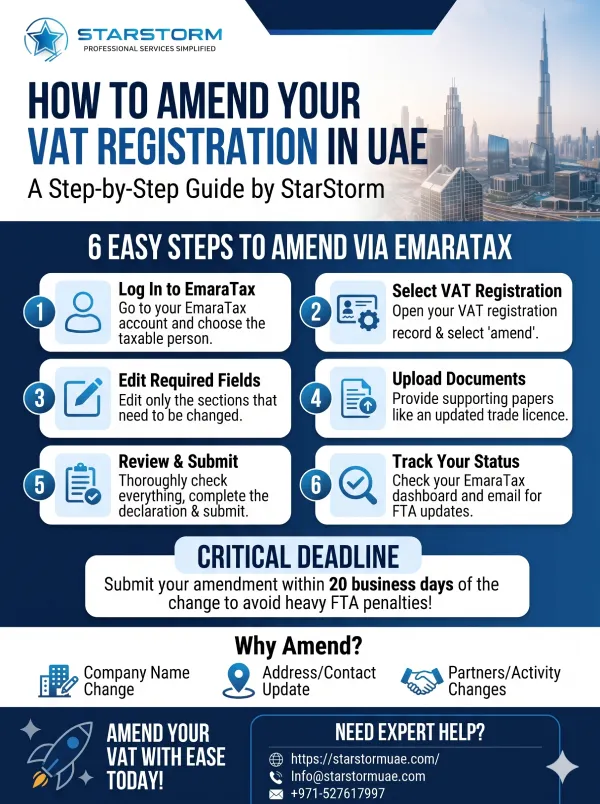
Amendments are submitted online through the official EmaraTax portal. The FTA updates the portal from time to time, so screen labels may differ slightly, but the process generally runs like this:
- Log in to your EmaraTax account and select the taxable person whose details you need to change.
- Open the VAT registration record and choose the option to amend it.
- Edit the relevant sections only. Leave unchanged details as they are.
- Upload supporting documents that show the change, such as an updated trade licence.
- Review everything carefully, complete the declaration and submit the request.
- Track the status from your EmaraTax dashboard and check your registered email for FTA messages.
If the FTA needs more information, it may return the request for clarification or additional documents. Respond promptly and within any time stated, because the request cannot move forward until you do. The FTA does not commit to a fixed approval time, so submit early rather than close to your deadline.
How to Change Company Name in FTA Portal
A name change usually starts with your licensing authority, not the FTA. Once your trade licence shows the new name, update your VAT record through the same EmaraTax amendment process:
- Edit the legal name fields, in English and Arabic where the form requires both.
- Upload the updated trade licence as evidence.
- Submit the request and watch for any FTA follow-up.
Depending on the change, the FTA may ask for further documents. Enter the new name exactly as it appears on your licence, because a mismatch can lead to the request being returned for clarification.
Documents and Information to Prepare
Requirements depend on what you are changing, and the portal indicates what to upload for each section. As a starting point, have ready:
- Your EmaraTax login details and Tax Registration Number (TRN)
- An updated trade licence, where the change appears on it
- Documents that support the specific change, such as evidence of a new address
- Identity documents for new signatories, owners or partners, where requested
- The date the change took effect
Keep copies of everything you upload, along with your submission confirmation.
FTA VAT Amendment Penalty and How to Avoid It
Under the Executive Regulation of the Tax Procedures Law, a registrant must notify the FTA of changes to its registration details within 20 business days of the change. Missing that deadline can lead to an administrative penalty for failing to inform the FTA of an amendment to the tax record, with a higher amount for repeated violations.
Filing an amendment does not, by itself, trigger a penalty. The risk comes from notifying late or not at all. Penalty amounts are set by Cabinet decision and have been revised over the years, so check the current schedule on the FTA website rather than relying on older articles.
To stay within the deadline:
- Treat licence renewals, office moves and rebrands as VAT triggers.
- Start the amendment as soon as the change takes effect.
- Keep evidence of the date each change happened.
- Make one person responsible for monitoring FTA emails and portal notifications.
If you receive a penalty you believe is wrong, the FTA has a reconsideration process with its own time limits.
Common Mistakes to Avoid During VAT Amendments
- Waiting for the next VAT return or licence renewal before updating the record
- Updating the trade licence but forgetting the VAT record
- Entering details that don’t match the supporting documents
- Uploading unclear, incomplete or expired documents
- Missing FTA emails that ask for more information
- Using an amendment when the change actually needs deregistration or a new registration
How StarStorm Can Help
StarStorm offers VAT registration amendment support for UAE businesses. If you are unsure which details need updating or what to upload, you can contact the team to discuss your situation before you submit.
Conclusion
Knowing how to amend VAT registration in UAE is mostly about timing and accuracy. Update your record through EmaraTax as soon as something changes, match every detail to your supporting documents, and keep an eye on FTA messages until the request is approved. Before acting, confirm the latest rules and penalty amounts on the FTA website.
Frequently Asked Questions
1. How to amend VAT registration in UAE when business details change?
Log in to EmaraTax, open your VAT registration record, edit only the details that changed, upload supporting documents and submit. Aim to do this within 20 business days of the change, then track the request from your dashboard.
2. How to change company name in FTA portal after a rebrand?
First, update your trade licence with your licensing authority. Then submit a VAT amendment in EmaraTax, entering the new legal name exactly as it appears on the licence, and upload the updated licence as supporting evidence.
3. When does an FTA VAT amendment penalty apply?
It can apply when a registrant fails to notify the FTA of a change to its tax record within the required timeframe. Penalty amounts are set by Cabinet decision, so always check the current schedule on the FTA website.
4. What happens if the FTA asks for more information?
The request is returned to you with a note on what is missing. Provide the information or documents through EmaraTax promptly, because the amendment cannot be approved until the FTA has everything it needs to review.
5. Is a VAT amendment the same as correcting a VAT return?
No. An amendment updates the details in your tax registration record, such as your address or legal name. Errors in a submitted VAT return are handled through a separate correction process with its own rules and deadlines.
Related Posts